
Loot Tables
Author what NPCs, items, objects and scripted events drop, choose between independent, table and wheel rolling, and simulate the results.
9 min read
What loot tables do#
A loot table decides which items a player receives when something happens in your game: an NPC dies, an item is opened, an object is searched, or a script hands out a reward. The Loot Tables tool in the Tools editor lets you build these tables visually, attach them to the things that drop them, and test the odds before you publish.
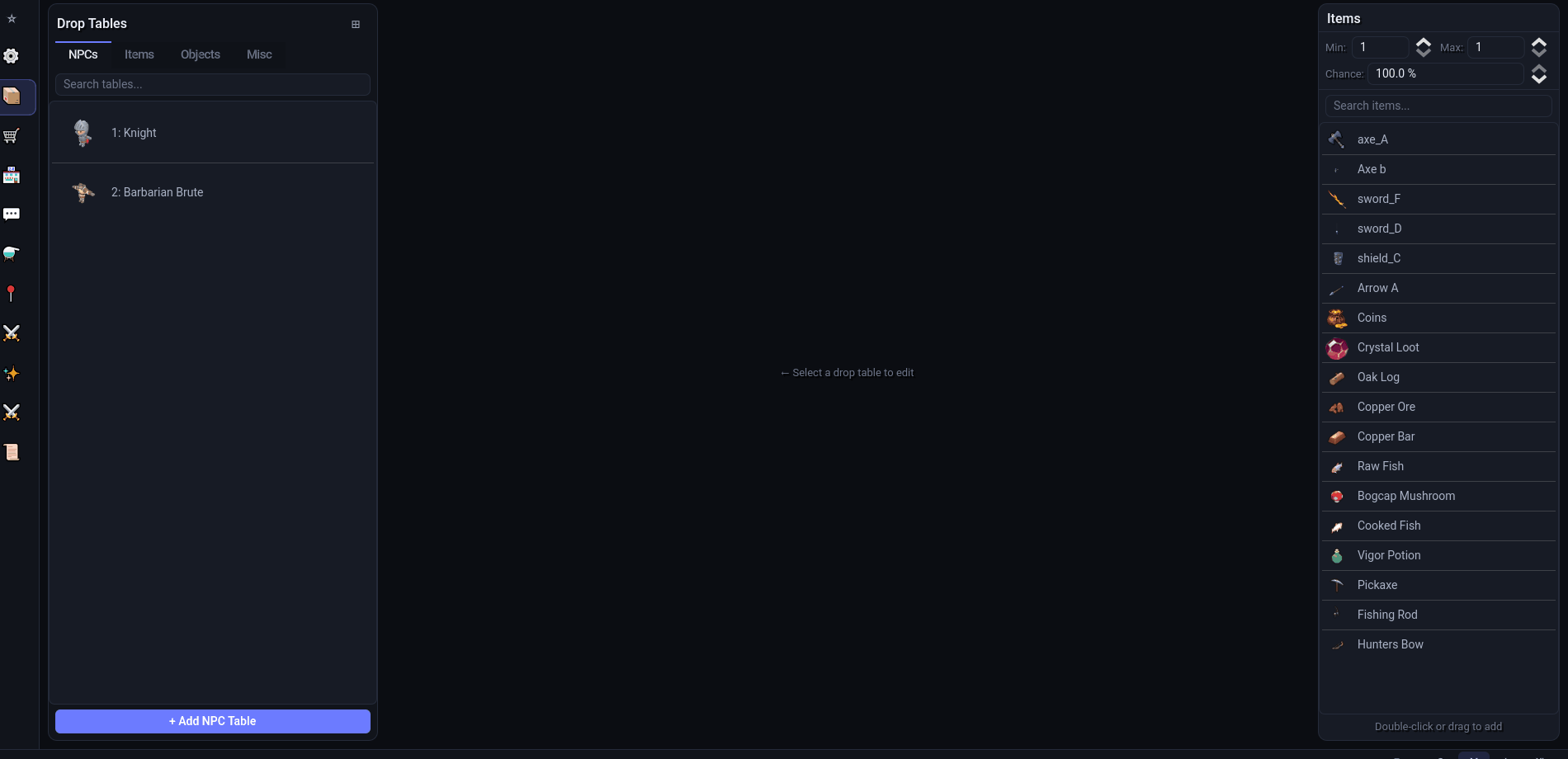
Every table has a source (what triggers it) and a drop type (how the server rolls it):
| Source tab | Triggered by | Where the loot goes |
|---|---|---|
| NPCs | The NPC dies | Spawned on the ground at the NPC, reserved for the killer for the loot-ownership window |
| Items | The player clicks an interact option on the item in their inventory | The player's inventory (ground if full) |
| Objects | The player clicks an option on a world object, or uses an item on it | The player's inventory (ground if full) |
| Misc | A script asks for the table by name | Wherever the script puts it: inventory or a position in the world |
Use loot tables whenever the reward is random or data-driven. If an NPC should always drop exactly one fixed item, a table with one 100% row is still the simplest way to do it.
Opening the tool#
- Click Tools in the top bar. The Tools hub shows a grid of tool cards.
- Click Loot Tables.
Once you are inside a tool, the icon rail on the far left switches directly between tools, and Main Menu returns to the hub. Leaving the tool saves any unsaved loot changes automatically.
The tool is laid out in three panels:
- Drop Tables (left) — the source tabs NPCs, Items, Objects and Misc, a Search tables... box, a tile/list toggle, and the add button (+ Add NPC Table, + Add Item Table, + Add Object Table or + Add Misc Table depending on the tab). Right-click a table for Duplicate or Delete.
- Editor (center) — open tables appear as tabs along the top (right-click a tab for Close Tab, Close Other Tabs, Close All Tabs). Below the tab bar is a toolbar with the drop type dropdown, an Unsaved indicator and Save, then the source chips, then the drops themselves, and a Simulate Drops button at the bottom.
- Items (right) — every item in the project with a Search items... box and a quick-add panel (Min, Max, Chance). Double-click an item, or drag it into the table, to add it with those values.
Create an NPC drop table#
- On the NPCs tab click + Add NPC Table. The Add NPC Drop Table window lists every NPC definition; search and double-click one. A new empty table opens in a tab and is saved immediately.
- Set the quick-add values on the right: Min and Max are the quantity range (1–9999), Chance is the percentage (0.001–100).
- Double-click items in the Items list, or drag them onto the table. Each row shows the item icon, name, Chance, Min and Max; you can edit any of them in place and remove a row with the x button.
- Click Save (or press
Ctrl+Swhile a table is open).
The chance column is color-coded so rare rows stand out, and rows are kept sorted by chance. The header shows how many drops the table holds.
Drop types#
The dropdown in the table toolbar chooses how the server rolls the table. Switching types converts the rows you already have, so you can start simple and restructure later.
Independent Roll#
Every row is rolled on its own. A 50% row and a 10% row can both drop from the same kill. This is the default for new tables and the easiest to reason about.
Table Drops#
Items are grouped into named sub-tables. Each group has a Chance to fire and a Rolls count (1–20); when it fires, the server picks that many random items from the group's pool, with equal odds within the group. Several groups can fire on the same kill. Groups are cards with their own + Add Item button and a color swatch you can override. Press + Add Drop at the bottom to add a group (it is created as "New Table" at 100%, 1 roll).
When you convert an Independent Roll table to Table Drops, rows are bucketed by chance: every row at 10% lands in a "10% Drops" group, and so on.
Wheel Drops#
Groups are weighted slices of a wheel whose weights should total 100. The wheel is spun Rolls per kill times (1–20, set in the bar above the groups); each spin lands on one group and yields one random item from it. A group with no items is a "Nothing" slice — the usual way to make most kills drop nothing. The Weight total: n / 100 label turns accent-colored while the weights do not add up.
Converting from Independent Roll to Wheel scales the chances down to weights, gives each item its own slice, and adds a "Nothing" slice for the remainder. The server actually spins over the real weight sum, so a wheel that totals 80 still works, but the percentages you see in the editor only match when the total is 100.
Item and object tables#
Item and object tables carry extra fields above the drops:
- Triggers — a list of ways to receive the drops. Any listed trigger fires the table. Click + Add Trigger and choose Interact Option (fires when the player clicks that option on the item or object; the dropdown is filled from the source's own interact options) or, on object tables only, Use Item on Object… (fires when the player uses a chosen inventory item on the object, with a Consume box to remove one of the used item when the drops fire). New tables start with one trigger on the
openoption. With no triggers at all, any interaction with the source grants the drops. - Key Item — an item the player must hold to receive the drops. Click None (click to set) to choose one; the x button clears it. The server removes one key item each time the drops are granted.
- Consume: Consume item on use (item tables only, on by default) — remove one of the source item when it is opened, which is what you want for a mystery box or a key-locked chest item.
When an item table fires, the player is told what they received; if the key item is missing they see "You need a key name to open this."
Misc tables#
Misc tables are standalone and keyed by a name instead of an entity. Click + Add Misc Table, enter a name in the New Misc Drop Table dialog (it is lowercased and reduced to letters, digits and underscores), and build it like any other table. The table header shows the id and a Rename button.
Scripts roll a misc table by that id. In a server script, player.GiveLoot("raid_chest") rolls the table into the player's inventory (overflow lands at their feet) and returns what was granted. The static ScriptLoot class offers Roll(tableId) (just the rolled list), GiveToPlayer(player, tableId), DropAt(tableId, position, region, instance, owner) and TableExists(tableId). See NPC, object and interaction scripts for where such code lives.
Simulate drops#
Click Simulate Drops at the bottom of a table to open the simulator. Set Kill count (default 1000, up to 1,000,000) and press Simulate; the window fills with item slots showing the total quantity of each item across all kills, most common first. The simulator rolls the Independent Roll rows of the open table; Table and Wheel groups are not simulated.
Files written#
Tables are saved under the project's server/schemas/Drops/ folder, one data file per source and drop type. Each folder also holds a schema description file the server's data store reads.
| Source | Independent Roll | Table Drops | Wheel Drops |
|---|---|---|---|
| NPCs | npc_drops/npc_drops_data.json | npc_table_drops/npc_table_drops_data.json | npc_wheel_drops/npc_wheel_drops_data.json |
| Items | item_drops/item_drops_data.json | item_table_drops/item_table_drops_data.json | item_wheel_drops/item_wheel_drops_data.json |
| Objects | object_drops/object_drops_data.json | object_table_drops/object_table_drops_data.json | object_wheel_drops/object_wheel_drops_data.json |
| Misc | misc_drops/misc_drops_data.json | misc_table_drops/misc_table_drops_data.json | misc_wheel_drops/misc_wheel_drops_data.json |
Every file is a JSON array of tables. Each table is keyed by npc_ids, item_ids or object_ids (an array of definition ids, so one table can serve several sources) or, for misc tables, a table_id string.
| Field | Drop type | Meaning |
|---|---|---|
drops[] | Independent | Rows of item_id, amount_min, amount_max, chance (0–100) |
tables[] | Table | Groups of name, chance, rolls, items[] (item_id, amount_min, amount_max) |
groups[] + rolls | Wheel | Groups of name, weight, items[]; rolls is the spins per kill |
triggers[] | Item / object | {"type": "option", "option": "search"} or {"type": "item_on", "item_id": 5, "consume_item": true} |
trigger_option | Item / object | Legacy single option; the editor mirrors the first option trigger here so older server modules keep working |
key_item_id | Item / object | Required item, -1 for none |
consume_source | Item | Remove the source item on use (default true) |
[
	{
		"npc_ids": [2],
		"drops": [
			{ "item_id": 7, "amount_min": 10, "amount_max": 40, "chance": 100 },
			{ "item_id": 18, "amount_min": 1, "amount_max": 1, "chance": 2.5 }
		]
	}
]
How the server uses them#
The bundled gameplay modules roll the tables at runtime; you do not write any code for the common cases.
- NPC death — the
dropsmodule listens for entity deaths and runs all three NPC systems for that NPC id. If the NPC has a script that overridesGetDrops, the script's list is used instead and the tables are skipped. Drops spawn at the NPC's position in its instance, owned by the killer. - Object interaction — the
object_dropsmodule checks the clicked option (or the item used on the object) against the table's triggers, then the key item, then rolls. A matching table marks the interaction as handled. - Item use — the
item_dropsmodule finds tables matching the item and option, checks and consumes the key item, consumes the source item whenconsume_sourceis on, rolls every matching system and reports the results to the player.
Option ids are compared case-insensitively, and an empty option in a trigger matches any option.
With AI (MCP)#
list_drop_tables— shows all twelve tables with their row counts, so you can see where a project's loot lives.set_drop_table— writes one table:source(npc,item,object,misc),system(independent,table,wheel), the owner id ortable_id, anddrops,tablesorgroups+rolls, plustriggers,key_item_idandconsume_sourcefor item and object sources. Setting one system leaves the owner's other two untouched.get_schema_datawith a table name such asnpc_table_dropsreads the raw rows.
See the tools reference for full argument lists.